https://www.instagram.com/reel/DNn1VONsUNq/?igsh=Z3JramFtOTJ5aDdj
Sunday, November 30, 2025
Prompt Strategy - Stop saying ChatGPT to “summarize this”Text
Stop saying ChatGPT to “summarize this”Text |
|
| |||||||||||||||
Hello writers
Today, I will show you how to Actually summarize text with AI; Why you shouldn't type “summarize this text” with AI: 

What I will cover today;
• How to stop getting surface-level, generic summaries 
( I will teach you how to force AI to give you sharp, useful outputs.)
• How to make the model classify, extract, quote, cite, analyze, and reframe your text on command. 
(The right way to summarize text without hallucinations)
• How to strip out the noise without losing the gold:
Keep the nuance, intent, contradictions, and hidden layers intact, instead of flattening them.
• How to get the exact kind of summary you want: (every time)
→ I will teach you how to turn any document into:
Role-based summaries, action plans, core principles, frameworks, strategic insights, and expert-level consultants.
The Problem:
Why you shouldn’t prompt ChatGPT the generic “Summarize this Text”
It gives the model no goal or direction.


AI doesn’t know what you want [eg, major insights, contradictions, risks, shifts, or a framework.]
It strips nuance and context out of the text.


(AI won’t catch the writer’s motives, tone shifts, contradictions, or why things happen)
It collapses complex ideas into a flat recap.


(You lose depth, structure, and the multi-layer meaning behind the text)
It forces the model into safe, generic mode.


(AI defaults to bland summaries and removes any message that was sharp or specific)
It is more likely to hallucinate the output summary


(because of the lack of instructions poor text scanning of the material)
The lesson:
Stop asking AI for generic summaries.
Start asking for real directions to parse on.
What you want is the model to classify, extract, quote, cite, analyze, and reframe the content.
Not compress it and strip its core meaning:
My Secret Hacks: The Precision Summary Pack:
Use targeted mini-prompts that force the model to see the text through a specific lens. This gives you insights you can actually act on.
❶/ Summarize by Role:
Why it works like a charm:?
( I realized that if AI summarizes the content by a given role it will force itself to filter for relevance. When I use this mini-prompt, it removes 80% of the noise and keeps only what my its needed.)
Mega-Prompt;
Summarize this content for someone working as a [# TYPE THE ROLE].
Focus only on what that person would find useful:
• The problems this role typically faces
• The decisions they’re responsible for
• The constraints, risks, and edge cases they track
• The opportunities or high-leverage points stated in the text
Citation Rules:
1) Every claim must cite the original text verbatim using short inline quotes.
2) If the relevant text is long, quote only the key phrase (page, paragraph, or line number).
3) If a detail is not explicitly in the text, respond with: “Source not found.”
4) No invented details. No assumptions. No filler.
Deliverables:
1) A tight, role-specific summary (with verbatim inline quotes)
2) 3–5 high-leverage insights (each insight must include a verbatim quote)
3) Action steps grounded in the text (each step must include a verbatim quote)The more specific you make the role, the easier it is for the AI to strip out anything that doesn’t fit that role.
❷ Turn Text Into an Action Plan;
Why it works like a charm: ?
(This turns passive information into steps. Every time you use this, you walk away with a clear path to implement instead of vague ideas.)
Extract the core lessons from this material and convert them into a concrete, step-by-step action plan I can execute now.
Requirements:
• Translate each major insight into an actionable step (no abstractions).
• Show the sequence: what must happen first, what depends on what.
• Clarify the objective of each step — what success looks like.
• Add the tools, resources, or decisions required to complete each step.
• Flag potential risks, bottlenecks, or failure points.
• Adapt the plan to both business and personal workflow contexts (state differences if needed).
Deliver the final output as:
1) A numbered action plan (from start to finish)
2) A short rationale explaining why this sequence works
3) A quick-start version (3–5 steps) for fast executionHow to be more specific on the Action plan;
1/ Add a role; remember what I said “The more specific you make the role, the easier it is for the AI to strip out anything that doesn’t fit that role;”
2/ Recall the specific part; If its a large text explicitly instruct AI where to work on the text;
❸ Identify Core Principles
Why it works: ?
(I used this prompt to transfer Principles smarter to any project Im working on. This prompt help you spot the best lessons that generic summaries always hide.)
MEGA-PROMPT;
Read this document and identify the core principles, mental models, and decision rules that repeat across the text.
For each one:
• Define it in plain language.
• Show where it appears in the document (patterns, behaviors, arguments).
• Explain how it connects to the other principles.
• Explain why it matters — what it lets someone do, avoid, or see.
End with a distilled list of the 3–5 principles that drive everything in the document.Advanced variations for this prompt: (use them if you want better specific summaries)
A. If you want zero fluff:
Strip out any phrasing that isn’t a principle. No summaries. No commentary. Only mental models and their functional consequences.B. If you want it in a mental-model style framework:
Map each principle to a known mental model (e.g., Inversion, Second-Order Thinking, Constraints, Leverage).
Explain the match.C. If you want the content to read like a playbook:
Translate the principles into practical operating rules someone can apply immediately.❹ Compare and Contrast;
Why it works like charm:
This prompt forces deeper reasoning. When i used this for the first time, AI revealed blind spots I didn’t know were in the text.)
Read the text and map its core arguments.
For each argument:
• Identify the dominant opposing view in the same field.
• Compare them directly: where they align, where they diverge, and the reason for each divergence.
• Explain the implications of the disagreement — what changes in practice, outcomes, or decisions.
End with a summary of the most consequential divergences (ranked by impact).❺ Extract Strategic Insights;
Why it works like a charm:
(It pushes the model into the expert mode. I use this when I want the conclusions that change decisions, not summaries.)
Analyze this text like a strategy consultant.
Step 1 — Extract the key insights:
• The non-obvious truths.
• The assumptions driving the author’s logic.
• The leverage points (what shifts the outcome most).
Step 2 — Surface the missed opportunities:
• Gaps in logic.
• Blind spots.
• Untapped advantages the author doesn’t mention.
Step 3 — Define the strategic implications:
• What decisions these insights should change.
• What actions I should act on immediately.
• What to stop, start, or double down on.
Deliver the output as:
1) Insights (ranked by impact)
2) Missed opportunities (with consequences)
3) Immediate actions (clear, terse, operational)The keyword “strategy” is the secret trigger that pushes Ai into an expert mode to give you strategic insights;
❻ Create a Knowledge Framework
Why it works:
(Frameworks make the text reusable. This is how you convert raw information into models you can teach or repurpose.)
Turn this content into a reusable framework that explains the topic clearly and logically.
Requirements:
• Identify the core idea the entire text rests on.
• Group the major concepts into clean categories, steps, or phases.
• Name each component with a short, memorable label.
• Define each component in 2–3 tight lines.
• Show how the components connect (flow, dependencies, or feedback loops).
• Include one concrete example that demonstrates how to use the framework in practice.
End with the full framework in a single, skimmable outline I can teach to others.❼ Extract What Others Overlook ( what you may miss when reading)
( I find this more valuable especially after reading. It finds the hidden meaning of the content. When you run this, AI catches the subtle signals that you might missed when reading the Content.)
Mega-Prompt:
Read the text and surface the expert-only insights.
For each section:
• Identify the hidden assumptions the author is relying on.
• Call out any biases (conceptual, methodological, strategic).
• Expose the unspoken implications — what the author is signaling without saying.
Then:
• Explain why each hidden element matters (what it changes in interpretation or decision-making).
• Rank the top 3–5 expert-level insights most readers would miss.
Keep the output blunt, analytical, and tightly reasoned.WHAT THESE PROMPTS AVOID:
Surface-level summaries
(AI stops giving shallow recaps and starts analyzing the text)
AI hallucinations
(Clear instructions reduce confusion and force accurate reasoning)
Wasted time on chasing specific summaries
(You get the exact output you want in one run)
AI skipping or misreading parts of the text
(Structured prompts force the model to scan the full material)
WHERE TO USE THESE PROMPTS?
NotebookLM:


Best when you want to store, keep, and reuse your own information.Gemini:

Best for learning, relearning, and drilling concepts until they stick.ChatGPT 5:

Best for mentoring, and structured guidance.
Winners, Losers, and the New AI Divide in Creative Strategy

AI was meant to level the playing field. Instead, it has split creative strategy between a small group of super performers and everyone else.

AI was supposed to make creative minds obsolete and turn ad production into a commodity. But instead—as our survey of 380+ DTC marketers and 15 expert interviews revealed—there is a growing divide right now in creative strategy.
In this special Thumbstop Quarterly Pulse report, we uncovered a small group of super performers who are using AI to get real leverage and advance their careers, while everyone else dabbles and waits for clearer instructions.
AI didn't flatten the field. It split it.
This year began with big promises and bigger panic. “Replace your $250K creative team with N8N.” “Make a million ads with one click.” The internet was full of founders, freelancers, and futurists convinced they’d found the cheat code to fully automated advertising.
But as 2025 unfolded, the illusion of fully automated creative production faded. AI could make ads faster, but not better. It could scale production, but not strategic intent. It could flood the feed. But it couldn’t decide what mattered. Or figure out why.
AI, it turns out, didn’t level the playing field. It stratified it. When everyone could produce more ads faster, the only real advantage left was knowing the right kinds of ads to make.
What emerged was a new hierarchy in performance creative. And at the top stood creative strategists who were learning how to work more deliberately with AI tools instead of using them as a crutch to generate endless volume.
A strategist who once needed an analyst, designer, and media buyer can now do the work of an entire team — consolidating data, concepting, writing, and producing ads in a single working session. But the tools didn’t replace people. Instead they compressed the work around them. And the result wasn’t smaller teams, it was more autonomous ones.
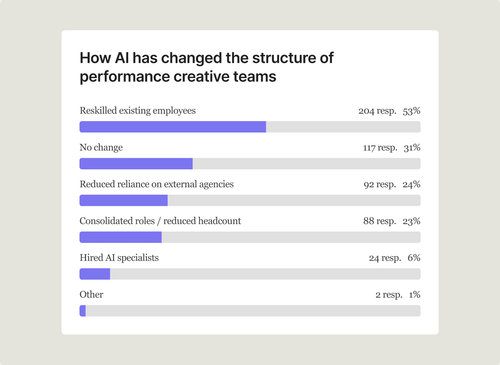
Our survey of 380+ advertisers confirms the pattern. Over half of performance creative teams are training their existing employees to use AI, while only 6% have hired specialists. That’s a culture shift. The people pushing performance creative forward aren’t waiting for job descriptions or expectations to catch up. They’re testing, experimenting, and turning AI into structural advantage.


Still, most teams hover at the surface. They use AI to brainstorm, summarize, and draft — useful, but shallow.
The best treat it differently. They build workflows that help them research faster, think more sharply, and systemize the parts of strategy that used to get stuck in bottlenecks. They're using AI to create real leverage.
Here is where the real divide has formed. Not between those who use AI and those who don’t, but between those who’ve gone deeper than the rest to build better systems with it.
The best creative strategists are proving that the real edge isn’t in having access to AI tools. It’s in going deeper and knowing what to do with them.
Where AI actually delivers for performance creative teams
It helps to zoom out and see where AI is actually pulling its weight across the creative strategy flywheel.
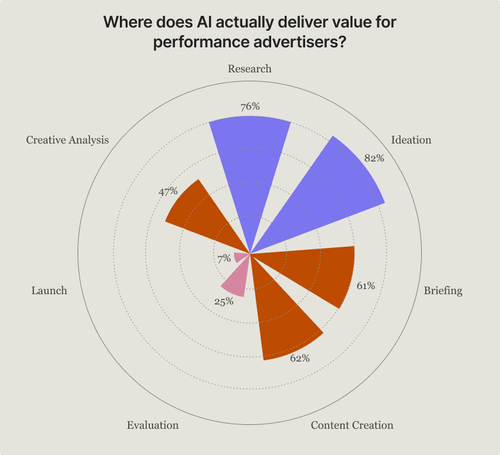
Adoption hasn’t been uniform — maybe unsurprisingly, it clusters upstream, during research and ideation, where the work is structured, repeatable, and information-dense. As tasks become more judgment-driven, adoption drops off.
According to our survey, 82% of performance creatives use AI during ideation, 76% during research, and 61% during briefing. But by the time you reach evaluation, usage falls to 25%, and at launch, just 7%.
Satisfaction with AI for different functions follows the same curve. Strategists give LLMs for brainstorming the highest ratings (7.7/10), followed by research/analysis agents (6.8/10). But satisfaction drops for video generation tools (5.2/10) and production more generally (4.2/10).
The pattern is clear:
This framework is more than an adoption chart — it’s a map of where leverage lives today. The best strategists aren’t using AI where it’s easiest. They’re using it where it actually creates value.
The workflows that follow show what that looks like in practice: deeper research pipelines, structured ideation systems, creative intelligence layers, modular production processes, and prompt architectures that cross every stage of the creative flywheel.


How the top 1% of creative strategists work with AI
AI now runs through the creative strategy flywheel, but maturity is what separates the best from the rest.
The top percentile of creative strategists treat AI not as a brainstorming assistant, but as a strategic layer threaded through their entire production process. They use it to surface signals they’d otherwise miss and reveal the patterns buried inside messy and unstructured data.
Their approaches feel less like tool play and more like architecture—systems built to illuminate what matters and filter out what doesn’t.
In the sections that follow, we spotlight five operators who exemplify this shift.
Each of their workflows is:
- Deep — grounded in real strategic thinking, not theory.
- Specific — showing concrete prompts, structures, and processes.
- Replicable — built to inspire immediate action.
Think of these workflows as field guides. Together, they show how the top strategists are reorganizing their work to move from wandering in the dark to working with a clear direction—using a handful of widely available tools to build durable creative advantage.


Workflow #1
Mining Reddit to find winning angles
How Brennan Tobin, Founder at OddDuck Marketing Group compresses weeks of manual research into hours — and surface sharper angles than competitors.


Research is where the strongest creative concepts begin. According to our survey, 76% of creative strategists already use AI at this stage of the creative flywheel — for interpreting comments, researching competitors, and consolidating reviews. However, most use it superficially, relying on loose summaries of large amounts of data that ultimately flatten nuance.
Top creative strategists go deeper. They systematically mine forums, reviews, and comment sections to uncover the emotional language, objections, and desires that shape high-performing creative.
Brennan Tobin is an agency founder known for building meticulous research systems that surface sharper creative angles than his competitors. In addition to asking AI to summarize pre-purchase pain points, post-purchase emotions, and customer profiles for brands, Tobin asks AI to search for verbatim customer quotes from places other creative strategists seldom look.

To do this, Tobin pairs ChatGPT with Reddit Answers to mine real conversations that feel closer to customer sentiment than generic LLM summaries. He applies a manual strategic lens to every output — merging, discarding, or reframing insights — to ensure they’re authentic and usable in the creative he’s making.
What goes in & what comes out
Inputs:
- Reddit Answers for verbatim Reddit data
- GPT for extraction and tagging
Outputs:
- Tagged pain points, archetypes, and differentiators
- Hook angles and key selling points derived from real language
- Creative briefs and TikTok outreach scripts generated via custom GPTs
This research flows upstream into custom GPTs for briefing and creator outreach, forming the strategic foundation for OddDuck’s ad creation.
The workflow
Step 1 — Start with the problem, not the product
Before touching Reddit, Tobin frames the human problem his client solves. He searches for pain points, frustrations, and desires without brand names. He uses natural phrasing — what a real person might type into Google or Reddit.
Examples:
- “My baby won’t eat solids”
- “How can I stay hydrated while running”
His goal is to develop an understanding of how people describe their struggles and what outcomes they hope for. This gives him the emotional context before introducing a brand or product to the equation.
Step 2 — Pull real conversations in Reddit Answers
Tobin pastes his queries into Reddit Answers and explores the top threads. He starts broad, then refines his search with product or niche-specific questions.
Example Prompt:
“Show me what people on Reddit are saying about staying hydrated.”
“Are there recurring words, frustrations, or emotional tones when people discuss electrolyte powders or pills?”
“What practical tips or comparisons do people share?”
Tobin gathers real language people use. He doesn’t rely on summaries — copying direct comments, noting tone and context, and clicking through to verify sources.
Step 3 — Verify links & extract verbatim quotes
Tobin clicks into the threads Reddit Answers surfaces. He confirms that the quotes are accurate, exist in real posts, and reflect genuine sentiment.
He copies lines that are emotional, specific, or descriptive and tags them with an emotion and a possible creative hook in a separate spreadsheet.
His goal is to develop a vetted collection of verified, high-emotion quotes that can later be transformed into creative insights.
Step 3A — Category landscape + reviews scan
When building a brief from scratch, Tobin then pairs his Reddit research with a top-down category scan. He uses this structured prompt to guide ChatGPT or Claude.
Step 4 — Cluster into angles Once quotes and category insights are organized, Tobin groups them into recurring narrative patterns. These clusters shape the creative messaging in his briefs.
Common clusters:
- Pain-first
- Before/After
- Tried-Everything
- Social Proof
- Identity/Community
- Transformation
Example: “Most powders taste fake” → Pain-first “Finally found one that tastes good” → Transformation At the end of this step Tobin has a clear, human-readable map of audience emotions and triggers that inform creative direction.
Step 5 — Turn quotes into hooks Tobin feeds each cluster into ChatGPT or Claude to transform raw quotes into usable ad hooks, headlines, or UGC openers. He keeps them short, natural, and true to the customer’s voice.
Prompt:
Example outputs: “Because hydration shouldn’t taste like chemicals.” “Finally, electrolytes that actually work.” “Stay hydrated — no sugar, no crash.”
Make sure you generate hooks directly tied to real human language, not jargon.
Step 6 — Verify, refine, and store Before using the hooks, Tobin runs a quick triage:
- Authenticity: Does it sound like something a real person would say?
- Emotion: Is it specific and felt?
- Compliance: Avoid unverifiable claims.
- Brand Fit: Matches tone and positioning.
He stores final outputs in a creative bank — a shared database of quotes, hooks, and archetypes for reuse across scripts, briefs, and campaigns.
Step 7 — Feed into custom GPTs (optional) Finally, Tobin uses Custom GPTs to turn this research into outputs:
- Creator Messaging GPT: Generates DM or email outreach messages for UGC creators using brand-specific inputs.
- Scripting GPT: Writes content briefs with hooks, selling points, CTAs, and tone direction.
Human review remains essential — AI accelerates ideation, but taste and judgment stay human.
What good looks like
This workflow turns hours of manual digging into a single working session, giving strategists a sharper understanding of customer language and providing creators with ready-to-run briefs. Its effectiveness depends on keeping a verbatim-first mindset, supplementing model outputs with authentic sources like Reddit, and applying human judgment throughout.
Tobin’s approach isn’t about over-automating — it’s about using AI to accelerate strategic inputs so that his team can spend more time on execution and testing.
Pro tip
Avoid letting GPT summarize too loosely. Tobin treats verbatim quotes as sacred raw material — summaries are optional, but specific language is non-negotiable. Start with quotes, then layer strategy on top.
Workflow #2
Finding the “why” behind emotional responses
How Sarah Levinger, Founder at Tether Insights, built a system that uses AI to uncover the real emotional reasons why customers buy.


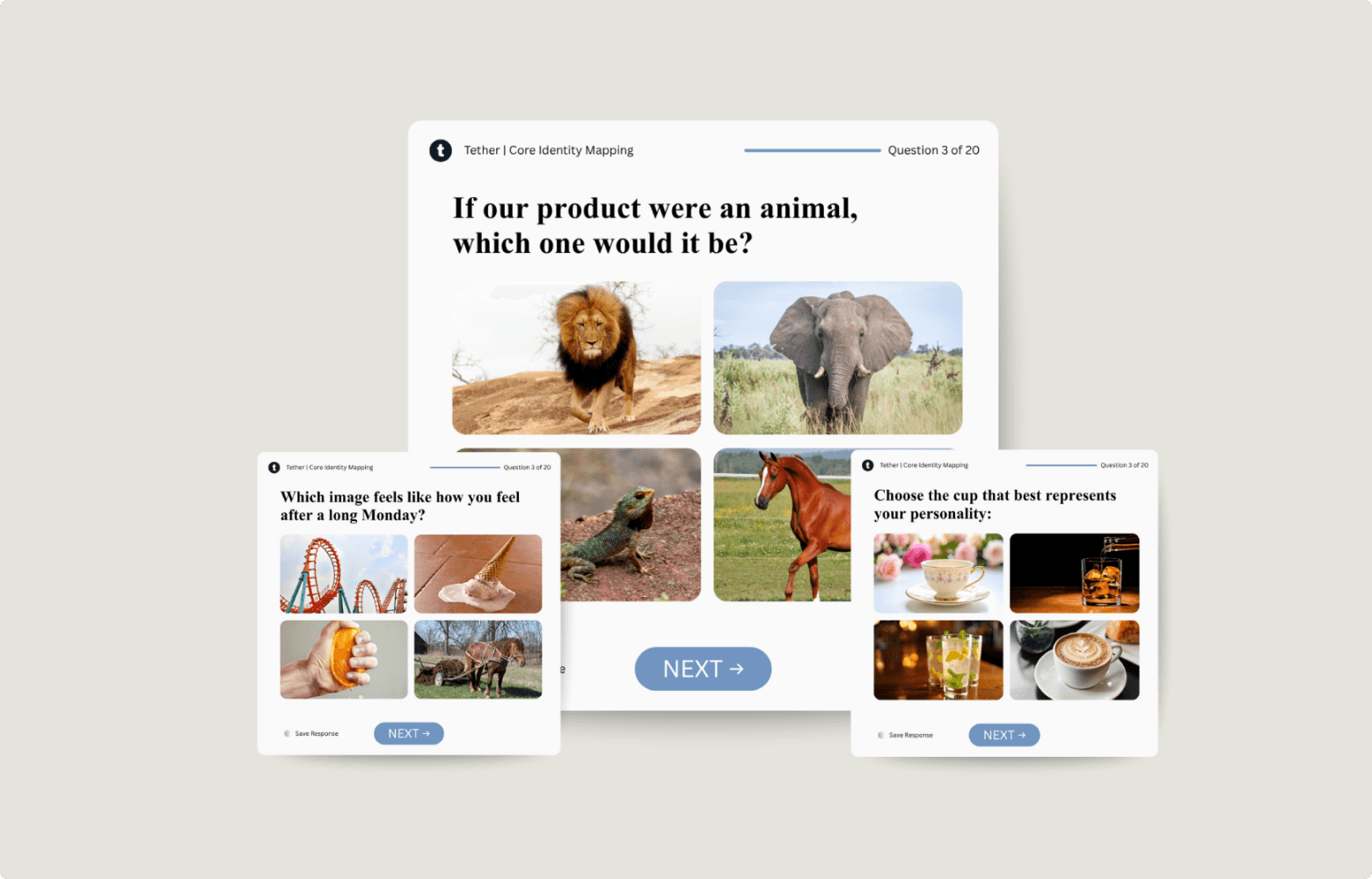
Most marketers test everything without knowing what they’re looking for. Sarah Levinger’s approach starts with a hypothesis. Instead of asking text-based survey questions, she asks customers to react to images. AI then helps her connect those emotional responses to the logic behind their decisions.
“You’re asking them to make an emotional response to an image,” she says, “instead of things like ‘where did you hear about us?’” The result is a structured and testable way to turn emotional data into a strategy.
Levinger describes her core identity map as “a BuzzFeed personality survey, but for customers.” Respondents are shown a series of images — each representing a feeling or belief about a product — and asked which one fits best.
Each image is broken down into JSON language so AI can “see” the elements within it — colors, symbols, body language — and correlate those with how people answer the follow-up question.
“I do that because I’m trying to pull out logical reasoning for their emotional answer… that way they can tell me both, and I can make a correlative map between the two,” says Levinger.
What goes in & what comes out
Inputs:
- Image-based customer questionnaire
- Metadata for each image (color, tone, symbolism, emotion)
- Customer selections and short text responses
- AI model (GPT or Claude) for correlation analysis
Outputs:
- Mapped correlations between emotional response and logical reasoning
- Insight statements explaining why people buy
- Psychological themes for use in creative briefs
- Stronger hypotheses for future testing
The workflow
1. Design an image-based survey
Levinger creates a visual questionnaire that asks people to respond emotionally to pictures instead of words. Each image represents a feeling, archetype, or belief.
- Use a survey hosting platform of your choice (e.g. Typeform or Survey Monkey )
- Aim for 4–6 images that represent distinct emotional states (e.g., calm, power, belonging, security).
- Keep the question intuitive: “Which of these feels most like your goal after using [product]?”
- Avoid literal product shots — focus on metaphor.


2. Collect emotional responses
Participants choose the image that resonates with them most. Short follow-up questions capture the reasoning behind that choice in their own words.
I.e. For the previous question, what made you choose [IMAGE] over [IMAGE]?
3. Translate images into LLM Legible data
Each image is converted into JSON language so the AI can “see” it — identifying symbols, colors, and attributes that convey meaning.
To try it yourself, use the following schema:
4. Run an AI correlation analysis
Levinger feeds both the image data and written responses into ChatGPT. The model finds patterns between what people feel (image choices) and what they say (their follow-up answers).
5. Extract the logic behind the emotion
AI highlights clusters of meaning — like indestructibility, safety, or freedom — that explain why people buy. These insights are distilled into actionable statements that feed directly into her creative briefs.
Pro tip
“Science needs a hypothesis,” Sarah says. “Go in and test in a very controlled, structured way so that you don’t lose pieces of data or inject bias into the system.”
By using AI to connect emotional choices to logical reasoning, Sarah turns what used to be gut instinct into structured, repeatable insight.
Workflow #3
Turn research into dozens of creative angles using structured prompts
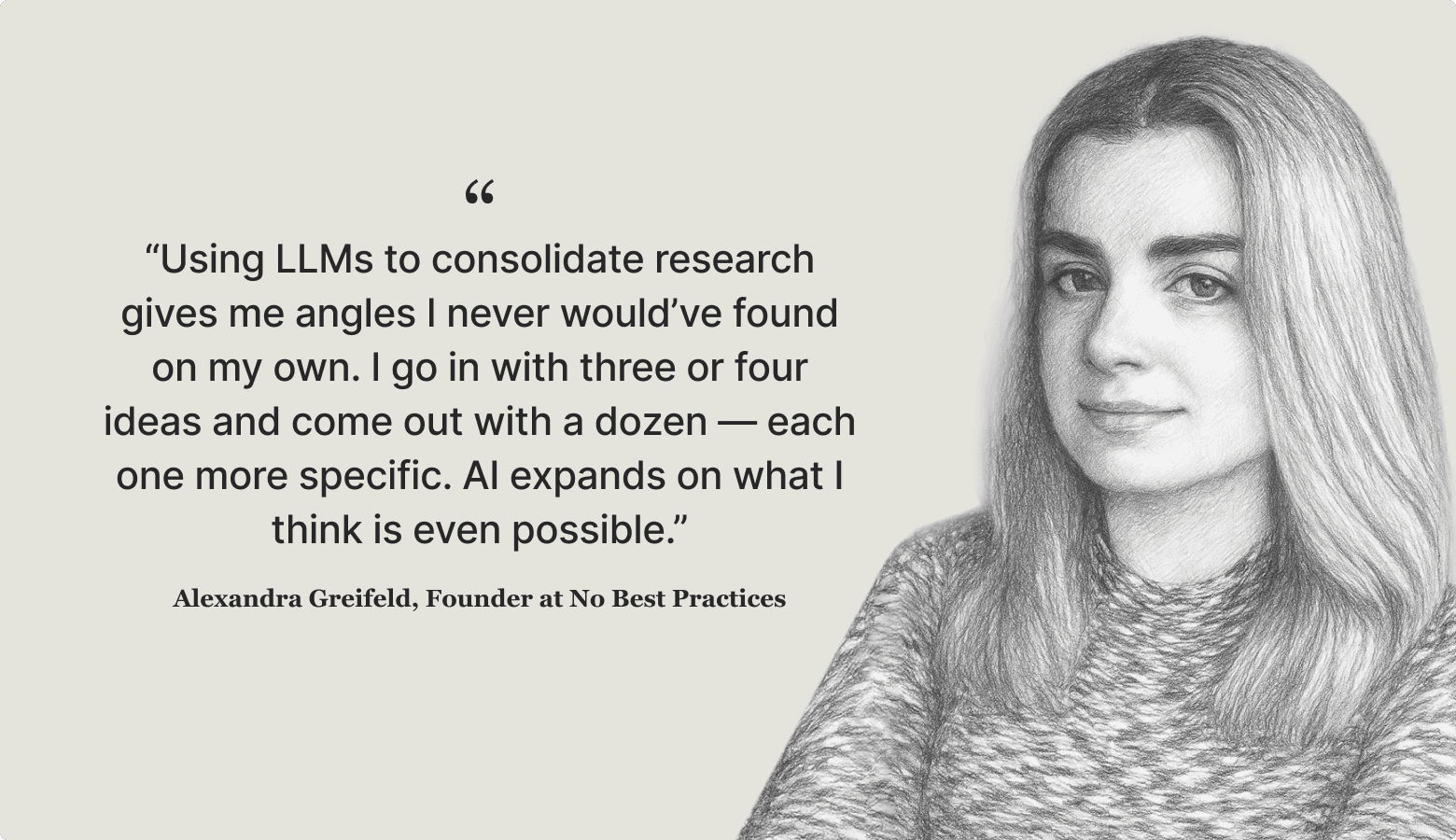
How Alexandra Greifeld, Founder at No Best Practices, turns deep research into dozens of testable creative concepts in a single working session.


Ideation is where deep research turns into opportunity. It’s also the stage where AI has gained some of the fastest and broadest adoption among creative strategists. Eighty-two percent of respondents to our survey use AI during ideation, more than at any other stage of the creative strategy flywheel. Satisfaction is similarly high — teams give AI tools for brainstorming and copywriting an average rating of 8/10, the strongest of any capability in our survey.
But high usage doesn’t always mean high leverage. Many strategists still fall into the “give me 10 ideas” trap — getting surface-level outputs that lack grounding or differentiation. Alexandra Greifeld, Founder at No Best Practices, presents a more advanced approach. She uses structured, reusable prompts against rich research inputs to generate dozens of distinct, testable angles in a single session.
Greifeld’s breakthrough came from realizing that you don’t get strong creative angles by asking AI for ideas directly — you get them by feeding it substance. She starts from real customer language and competitive insights, then runs a long, structured ideation prompt that she’s refined over time.
What goes in & what comes out
Inputs:
- Deep research reports (customer pain points, emotional triggers, differentiators)
- Brand context and positioning
- Top-performing ads for reference
Outputs:
- 10+ creative angles, often broken into sub-angles
- 3–5 ad variants per angle, ready for dynamic creative testing
- A structured ideation framework that can be reused for future campaigns
The workflow
1. Generate a Deep Research report (and extract angles manually)
Greifeld doesn’t start from a blank page or a “pretend you are a strategist” prompt. Instead, she uses ChatGPT to conduct a rigorous deep dive into the customer’s world, combining articles, forums, and reviews. She then manually extracts angles from that research, filtering for specificity, resonance, and strategic opportunity.
Below is the generalized deep research prompt Greifeld uses that you can copy, paste, and adapt for your own product or brand:
Greifeld then reads through the research output herself, scanning for latent emotional triggers, specific problem structures, and unique angles that competitors are missing. She doesn’t ask the model to generate angles at this stage — she does that manually, using the research as raw material.
2. Refine and structure angles
Once she’s identified promising directions, Greifeld applies a simple filtering heuristic to decide which angles are worth developing further:
- Emotionally resonant → Does this angle tap into a real desire, fear, or frustration?
- Structurally differentiated → Is it meaningfully different from existing angles, or just a rewording?
- Testable → Could this angle anchor a real ad variant?
She merges overlaps, discards weak ideas, and breaks strong high-level concepts into more specific sub-angles. This manual clustering ensures every angle is both strategically sound and creatively distinct.
Step 3: Expand and iterate
For each refined angle, Greifeld develops three to five ad variants, each tied to a single creative concept. She sets these up as dynamic creative tests, where each angle functions like its own mini-campaign.
She uses ChatGPT to push through creative fatigue, not to automate blindly. When she’s out of steam, the model helps her push ideas over the line, but the strategic scaffolding comes from her, not the model.
What good looks like
This workflow turns ideation into a repeatable, structured exercise, not a chaotic brainstorm. By combining deep research with a reusable ideation prompt and manual refinement, Greifeld can generate dozens of angles in a single session without producing generic filler.
Pro tip
Start from research, not vibes. GPT is only as good as the inputs you give it. Rich inputs mean more differentiated angles.
Workflow #4
Building AI-native video pipelines
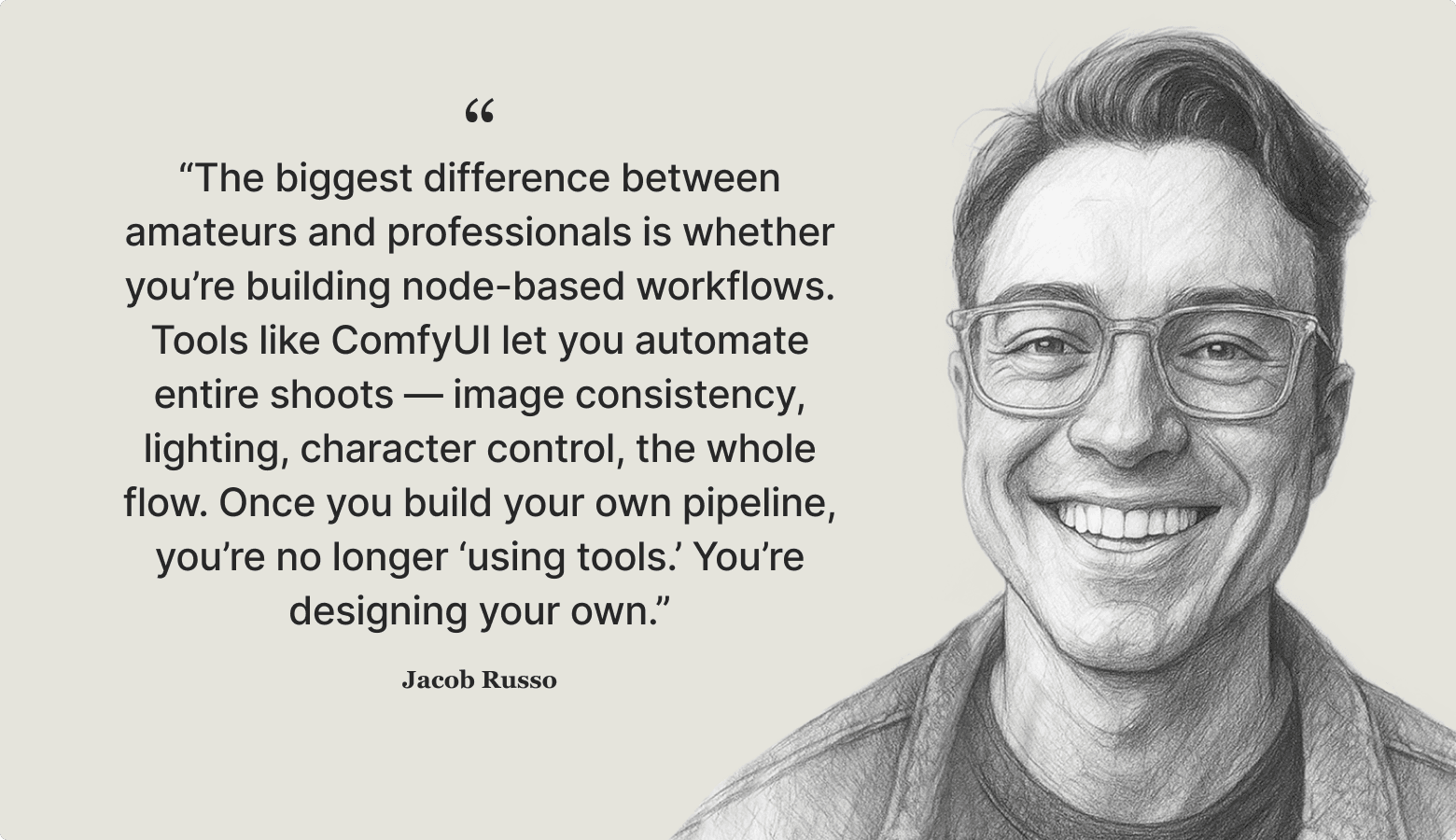
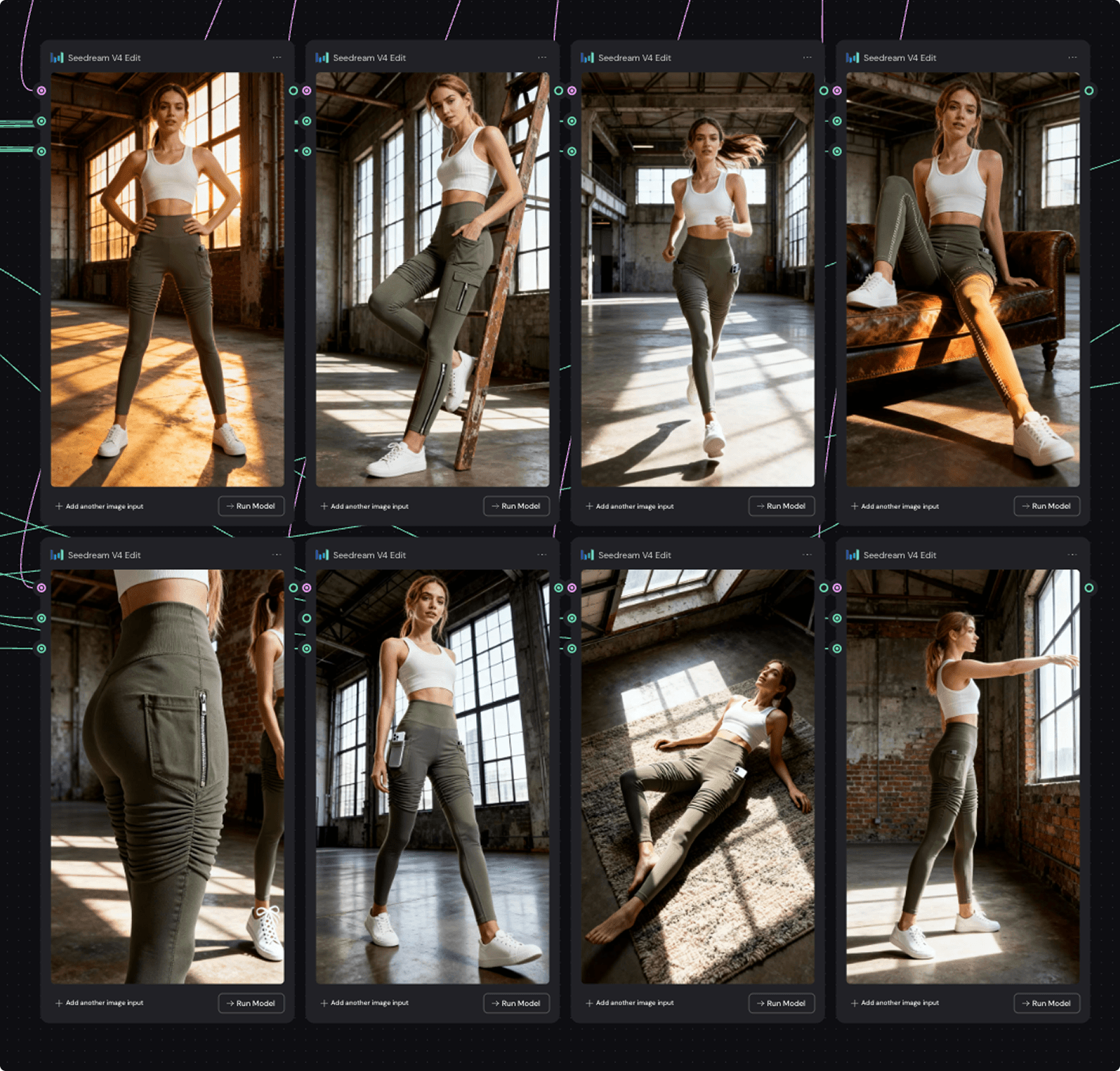
How Jacob Russo uses modular AI pipelines to turn ambitious ad concepts into high-quality video assets — faster, cheaper, and stranger (in a good way).


Most brands use AI as a brainstorming or copywriting tool. But production is where AI can create massive strategic lift. Sixty-two percent of teams currently use AI during content creation. At the same time, production is where teams report some of the clearest business impact: over half say AI has already reduced creative costs.
Yet satisfaction with the tools remains middling. AI video generation tools received a mean satisfaction score of 5.2/10 — revealing friction at this stage of the creative flywheel.
By chaining multiple AI models into a custom, reusable video pipeline, Jacob Russo addresses these issues head on — compressing production cycles from weeks to days, and unlocking visual directions that would be prohibitively expensive with traditional methods. For creative strategists, this is where AI workflows can deliver the greatest competitive edge: faster iteration, bolder creative, and leaner video production.

What goes in & what comes out
Inputs:
- Creative hook and concept direction
- Visual mood boards and style references (Nano Banana, Seedream, and Midjourney)
- Prompt templates refined with LLMs (e.g. ChatGPT, Claude)
- Aggregated model access through Freepik, OpenArt, and Weavy.ai
Outputs:
- Key frames and character assets with stylistic consistency
- Animated scenes generated through image-to-video techniques
- Polished video assets with brand overlays, VO, and finishing touches
- Archived node setups and prompts for reuse in future campaigns
Each project begins with a short R&D phase, where Russo experiments with models to match the creative vision. He prioritizes image-first generation to establish visual consistency before animation — a critical step for coherent storytelling across shots.
The workflow
1. Define the concept & visual style
Russo grounds each project in a creative hook, then builds visual mood boards using Nano Banana, Seedream and Midjourney (he warns that due to copyright issues, brands should avoid Midjourney for production). Russo uses an LLM to turn these references into structured prompt templates, specifying aesthetic details (lighting, texture, composition). This ensures stylistic consistency from the outset.


2. Generate key frames & assets
Instead of text-to-video prompting, Russo first generates hero frames, environments, and characters. Photoshop is still typically needed for refinement (Harmonize or Generative Fill are built-in AI tools in Photoshop that Russo finds particularly useful). This image-first approach is essential for maintaining character consistency across multiple shots, especially for recurring actors or products.
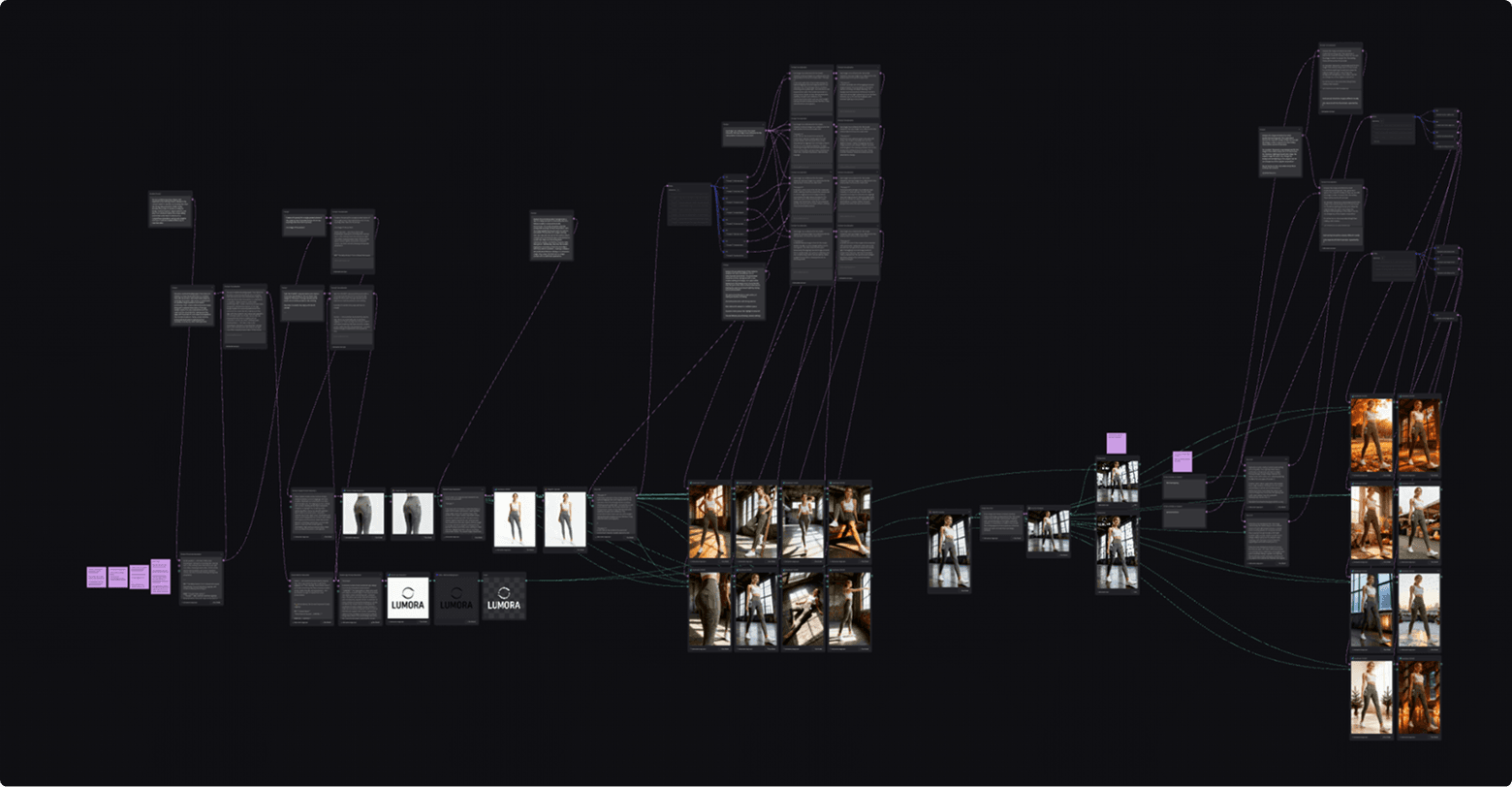
3. Build & iterate in Weavy.ai
Russo chains image generation and editing nodes inside Weavy.ai, combining image-to-video, interpolation, and overlays. This node-based structure allows him to quickly swap frames, rerun sequences, and restyle elements without starting over.


4. Layer in audio and finishing touches
Once the visual core is locked, Russo shifts focus to sound design — one of the most overlooked but powerful levers in AI-driven video production. Using ElevenLabs, he generates everything from character dialogue and voiceovers to sound effects and custom musical scores that match the pacing and emotion of each scene.
If lip-syncing is required, Russo relies on Sync Pro 2, Hedra, Dreamina, or Runway Act Two to align dialogue with character mouth movements. The goal isn’t hyperrealism but expressive, story-driven alignment — keeping the focus on emotional clarity and rhythm.
5. Export, review, & archive
Final assets are exported, reviewed internally or with collaborators, and archived with prompt logs and node setups. These archives become production toolkits that Russo can adapt for future campaigns, compounding creative leverage over time.
What good looks like
Russo’s modular production pipeline transforms ambitious concepts into polished video assets at a fraction of the usual cost and timeline. By starting with image generation, chaining multiple models through Weavy.ai, and finishing with hybrid human–AI editing, he compresses production cycles from weeks to days while maintaining stylistic control and character consistency across scenes.
This approach gives creative strategists a rare combination of speed, visual fidelity, and repeatability. Instead of reinventing the wheel for every campaign, Russo builds reusable toolkits that can be adapted and scaled over time. The result is a production process that encourages rapid creative experimentation without losing polish.
Pro tip
Start image-first. Even if you’re not ready to build full pipelines, adopting Russo’s image-to-video sequencing immediately improves consistency and quality. Aggregators like Freepik let you test multiple models without dozens of subscriptions, and Weavy.ai can slot into existing production stacks with minimal friction.
Workflow #5
Designing systems, not one-off prompts
How Noah King, CEO at Popsixle, builds agentic systems that scale across teams — turning prompting from a personal skill into an organizational advantage.


Most teams treat prompting as an informal skill learned through trial and error. But few teams apply structured systems to ensure consistency and quality across the entire creative strategy flywheel. This ad-hoc approach often leads to isolated wins but poor scalability as workloads increase or team members change.
Noah King, CEO at Popsixle, represents the next step: prompting as system design. By defining clear roles, structuring inputs, chaining assistants, and embedding everything into feedback loops, he treats models like architecture. This mindset turns prompting from a creative wildcard into a competitive advantage, especially for teams that need to scale workflows across strategists, designers, and growth marketers.

He distinguishes between system, user, and assistant prompts, using developer tools to control all three layers. Rather than chasing clever wording, King spends time designing the environment models that work within, which leads to higher-quality, more repeatable outputs.
What goes in & what comes out
Inputs:
- Structured system prompts and role definitions
- Form-like input schemas (brand background, audience, creative constraints, output format)
- Layered assistant personas for different creative tasks
- Internal prompt libraries with reusable variables and patterns
Outputs::
- High-consistency responses across research, ideation, and evaluation
- Modular “prompt frames” that can be adapted to new brands or campaigns
- Feedback loops that refine prompt systems over time
- Scalable workflows that can be handed off without quality loss
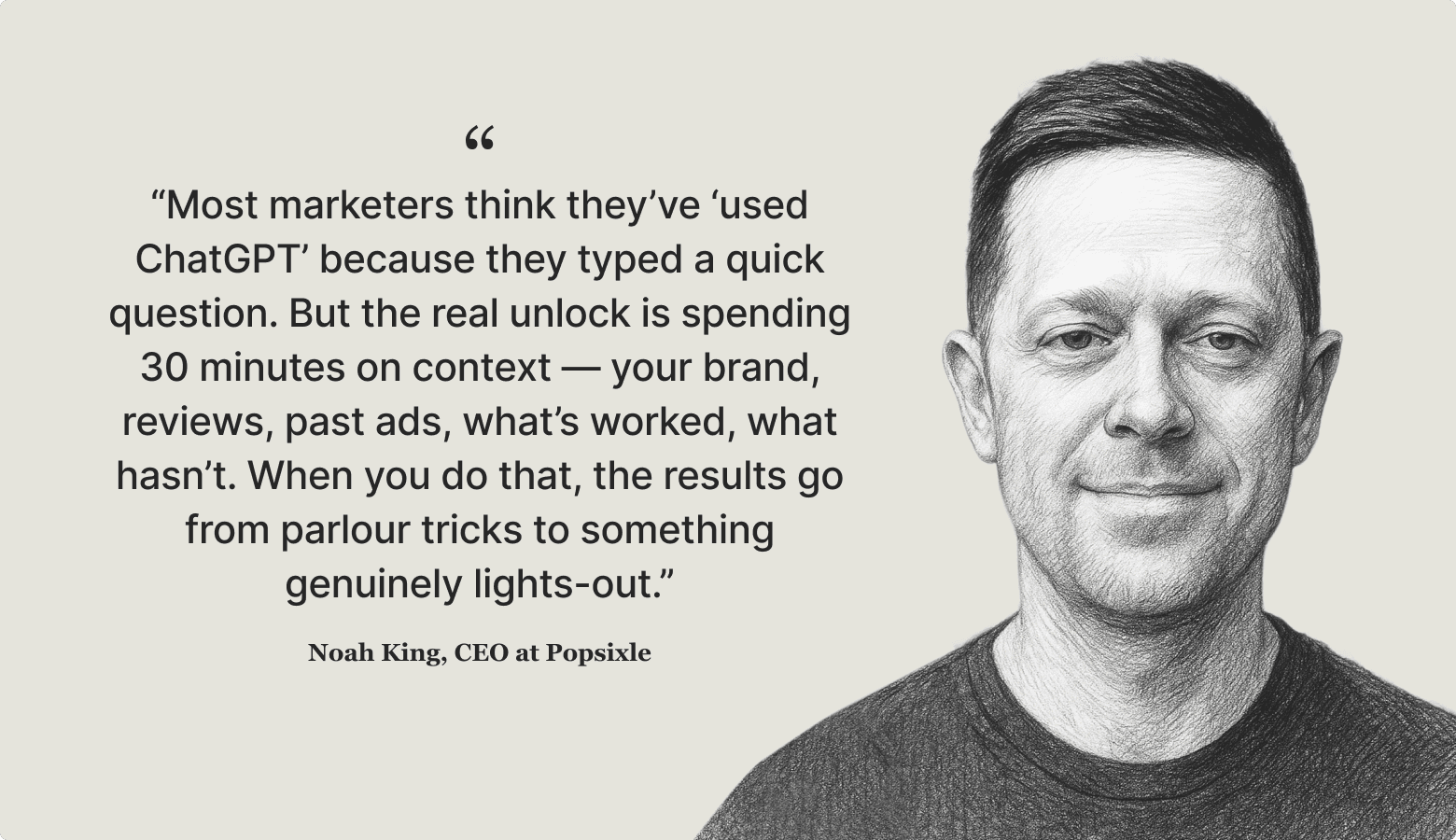
Noah often spends 15–30 minutes crafting structured inputs because careful upfront framing produces dramatically better answers than “lazy prompting.”
The Workflow
1. Define system roles clearly
Noah begins by writing precise system prompts for each task (e.g., “You are a classification expert,” “You are a senior DTC strategist”). This sets expectations upfront and yields predictable, repeatable outputs.
It might look something like the prompts below:
Or:
2. Create schemas, not blobs
Rather than pasting unstructured context, Noah formats inputs like forms — including brand context, target segment, creative constraints, and desired output structure. This structured approach reliably improves quality, especially in research and ideation tasks.
3. Layer assistant personas
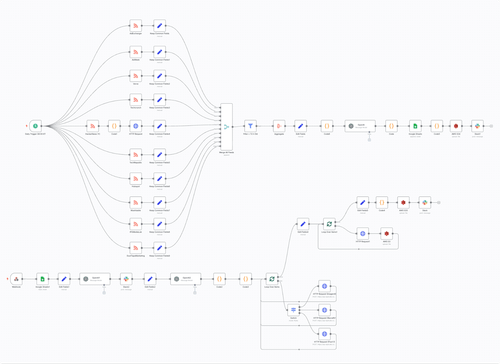
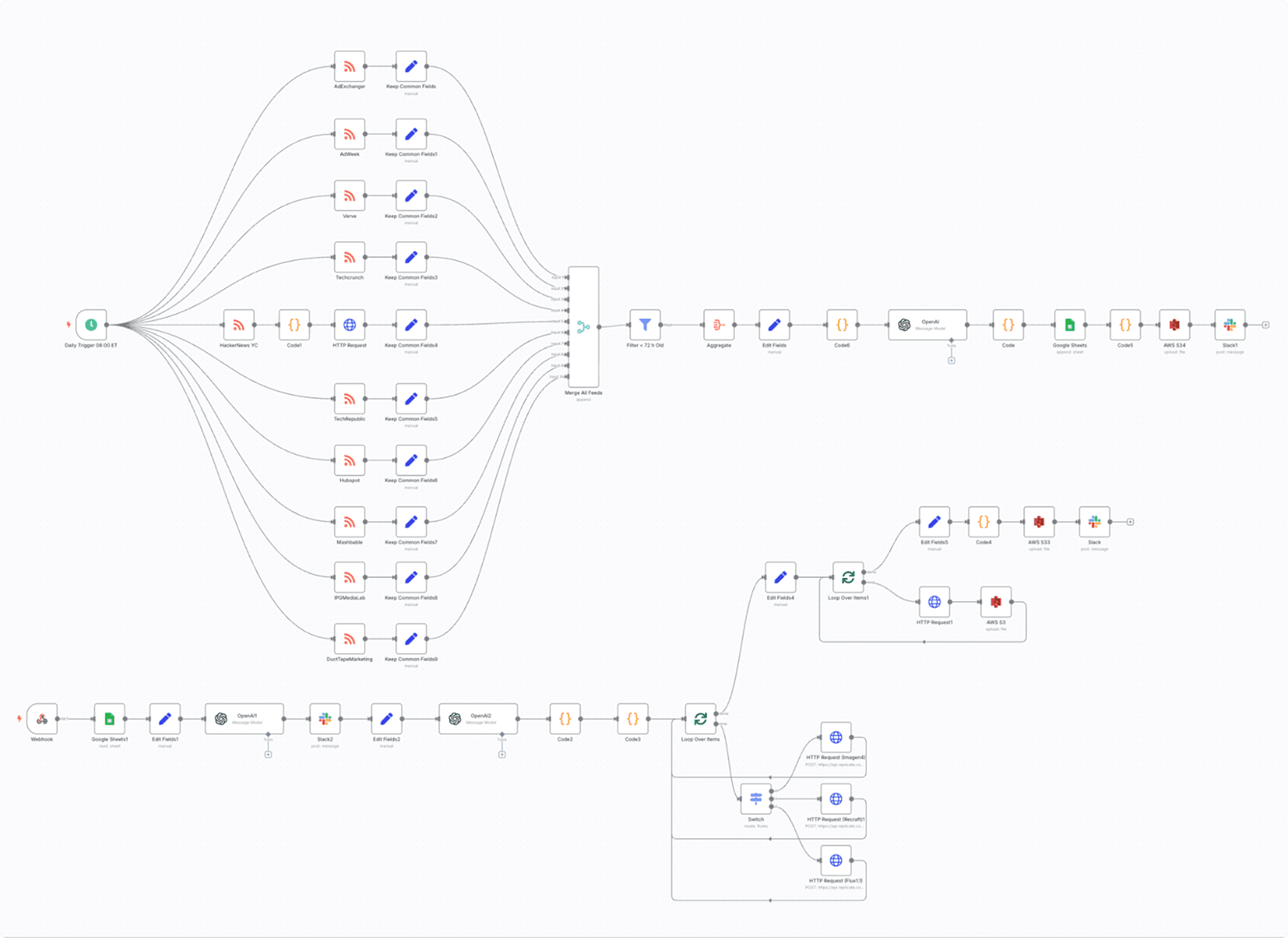
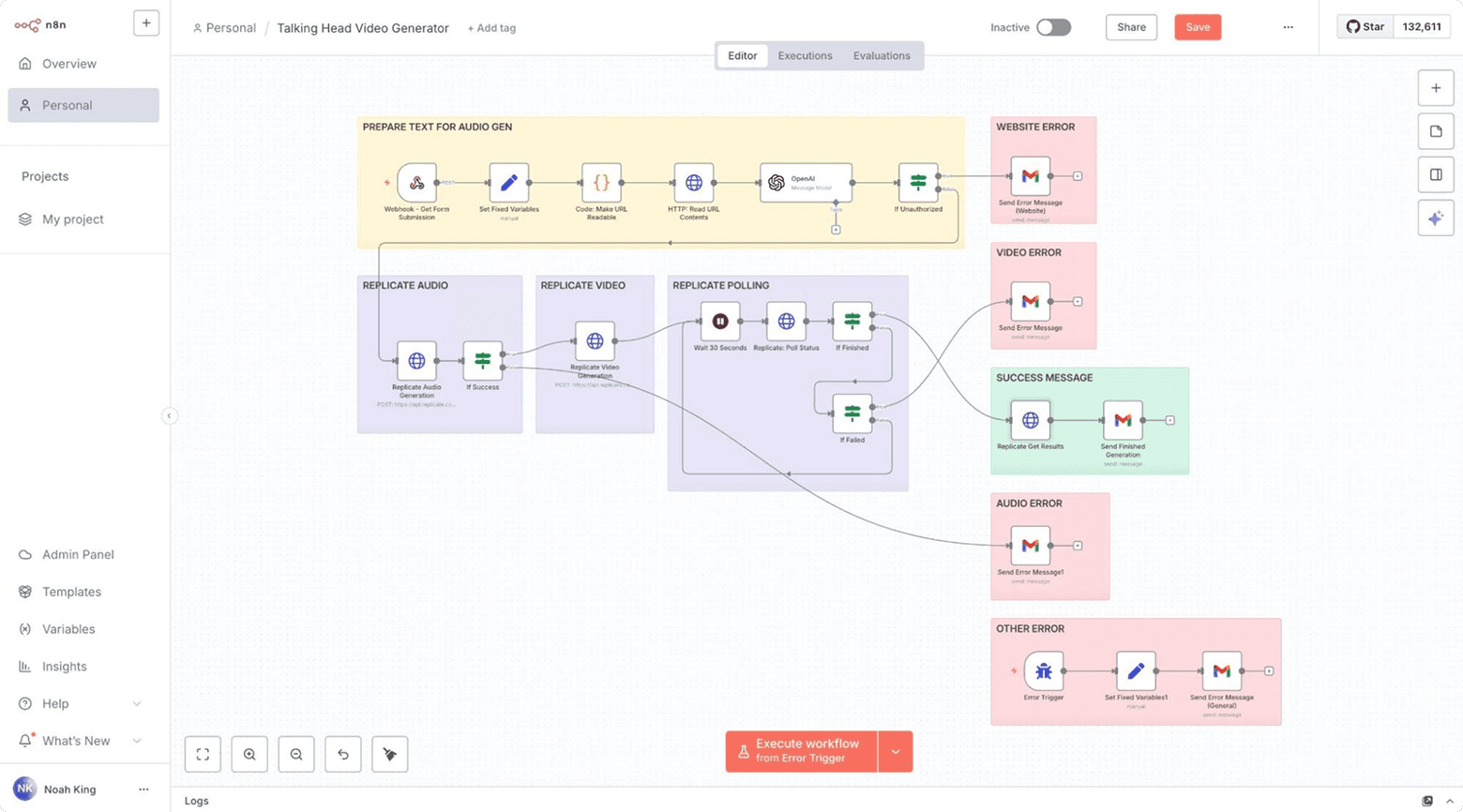
For complex workflows, Noah chains multiple assistants in node.js web apps or n8n (e.g., researcher → ideator → strategist) to mirror how creative teams work. Each assistant has a clearly defined role, reducing cognitive overload on a single model and improving precision.


4. Encode reusable task patterns
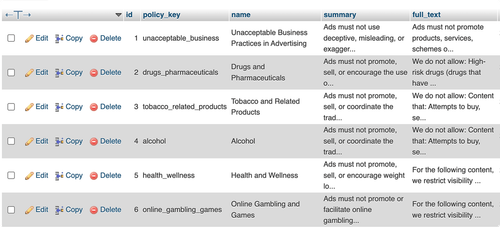
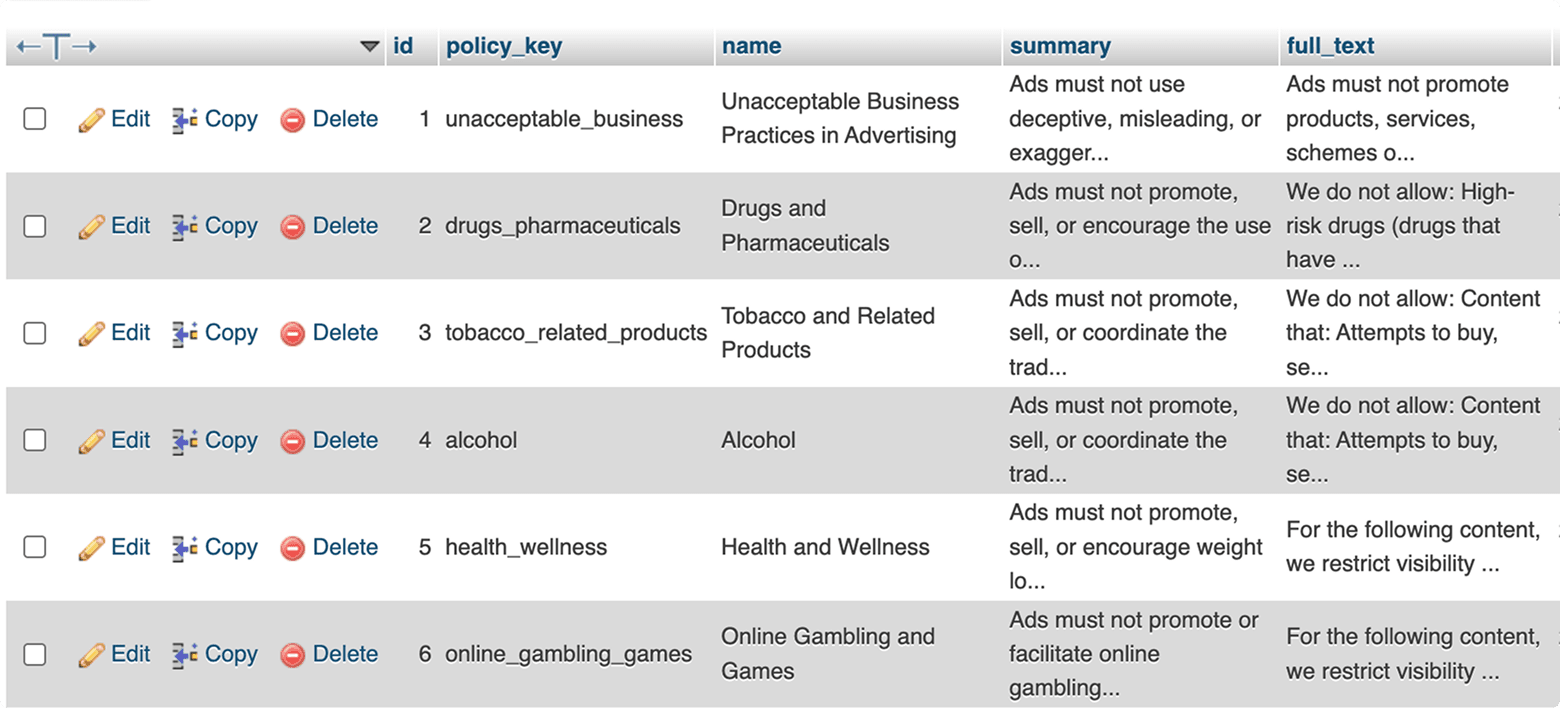
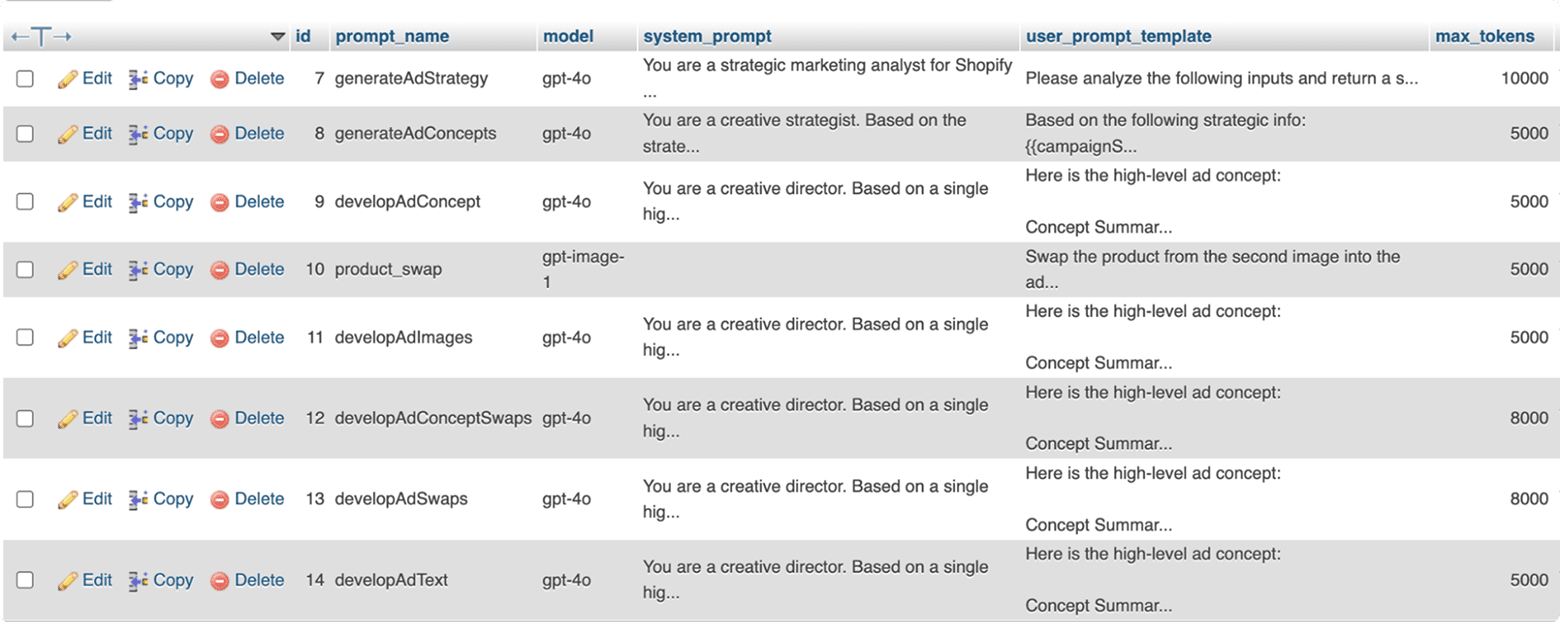
He encodes design principles in SQL database tables for the web apps or within individual nodes in n8n flows. Variables are clearly marked, making it fast to swap products or audiences without reinventing the logic each time.


5. Adopt a developer mindset
Noah treats prompts like internal tools — naming, documenting, and improving them as part of what he calls his “creative factory.” He uses APIs, N8N automations, and parallel prompt calls to scale ideation, testing, and evaluation — building systems that improve with every cycle.


What good looks like
Noah’s workflow turns prompting from a personal craft into a scalable organizational system. By codifying roles, schemas, personas, and task patterns, he creates reusable infrastructure that delivers consistent, high-quality outputs across teams and campaigns. His “creative factory” loops insights from real ad performance back into prompt systems, making each iteration smarter than the last. This structured approach separates top-tier practitioners from casual users—enabling teams to work faster and with greater strategic depth.
Pro tip
Treat your prompts like products. Name them, document them, and iterate. Even a simple internal prompt library with structured templates and clear variable fields can dramatically reduce inconsistencies and onboarding time as your team scales.


How AI-native creative strategists pull away
The first wave of AI adoption in performance marketing is over. What’s left is the gap between AI experimentation and true AI utility — a gap that’s widening fast.
A small group of strategists have rebuilt their workflows around it and are pulling further ahead. Most teams, meanwhile, are still tinkering at the edges — testing tools, waiting for clearer instructions, or hesitating at the first few obstacles. The tech isn’t the difference; it’s how quickly people learn to integrate it and keep moving.
The divide isn’t between large and small advertisers — it’s between those who’ve built systems and those who haven’t. Mature workflows treat AI as part of the strategic process itself. Others still use it as a shortcut. The distinction isn’t in the tools they use, but in how deeply those tools are embedded in the work.
The next advantage won’t come from automating more of the flywheel. It will come from how deeply creative strategists learn to weave AI into the craft of advertising — using it to spot patterns no human could, make choices with more confidence, and still know when to step away from the model.
The AI-native creative strategist is defined by depth, not breadth. They don’t chase every new tool. They build a handful of workflows that matter and commit to mastering them. And they understand both the promises and the pitfalls of automation.
If creating true leverage with AI is really about depth, here are the three levers that matter the most:
- Human insight, machine precision — use AI to expand your field of vision, not to decide for you. The best strategists use it to surface patterns and sharpen human judgment — not replace it.
- Creative systems, not shortcuts — treat AI workflows as creative scaffolding, not automation. Build systems that clear bottlenecks, amplify taste, speed up iteration, and clear space for more originality.
- Knowing how to locate the edge — the most advanced teams know where AI stops being useful. They draw the line between what can be optimized and what must be felt. That awareness will define the next generation of great creative work.
AI won’t replace the creative strategist. But it will reward the one who builds systems that think deeper, faster, and more clearly than everyone else.