
Publishing high-quality Instagram content can be time-consuming and resource-intensive. But there’s a way to engage your audience without having to pump out a never-ending schedule of original posts.
Reposting stories, photos, and videos from your customers and other accounts is a great way to boost engagement and grow your following without creating fresh content every single time.
As research has found, Instagram engagement increases by 28% when your followers interact with a mixture of user-generated content (UGC) and brand messages.
However, reposting on the Instagram app has some limitations and rules. Getting it right is important so you don’t damage your brand reputation.
Can I legally repost user-generated content (UGC) on Instagram?
When reposting someone else’s content on your account, one big concern is knowing how to get permission and credit the creator correctly.
To avoid falling foul of these rules and not being able to reach Instagram users, give proper credit with your caption and tag the original creator in the Instagram posts or Instagram Stories.
Whether you’re a small business, a creator, or a mid-size to large brand, don’t repost without either permission or tagging/crediting.
Pro Tip: For larger businesses especially, taking content without crediting is bad for your brand reputation. In the event of you wanting to repost a professional's work (e.g., a photographer, video producer, creator), ask a manager or budget holder first. Find a way to pay them a fair rate for their work. Credits and “exposure” doesn’t pay the bills.

Fashion retailer, ASOS, using the #AsSeenOnMe hashtag changed the eCommerce UGC game. It launched this campaign in 2014 and is still going strong. When you do a campaign like this, you can publish simple T&Cs that confer permission if people are posting pictures, videos, Stories, and Reels using branded hashtags. In this scenario, permission is granted by default.
However, if that’s not the case, it’s always best practice to ask permission before reposting anything. The best way to reach out to a creator or anyone you want to repost content from is to direct message (DM) them.
Pro Tip: Start following them first otherwise your message may go into Requests or Hidden Requests (spam, basically) and potentially not be seen. Here’s an outreach template you can use:
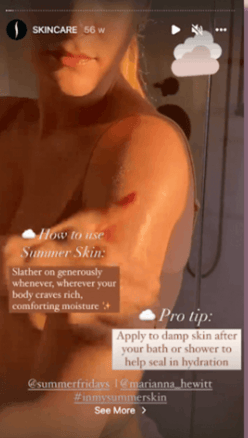
When sharing content from influencers and its customers to Stories, Sephora clearly tags creators.
When is the best time to repost an Instagram Story or Share a Feed Post to Stories?
Reposting content at the right time can boost engagement and extend your reach on Instagram. Whether you’re sharing a feed post to your Story or reposting a Story from another account, here are key ways to do this:
- Partnering with an influencer: Share their post or Story to highlight collaborations and maximise visibility.
- Featuring relevant brand content: If another brand’s post aligns with your audience, sharing it can build connections and credibility.
- Promoting your own feed post: Many users check Stories before scrolling their feed, so resharing a new post can drive more views and engagement.
- Showcasing user-generated content (UGC): If a customer shares content related to your brand, reposting it—whether they tagged you or not — helps build trust and community.
A strong reposting strategy ensures your audience sees valuable content in multiple formats, increasing engagement and interaction.
How do I repost a Story on Instagram?
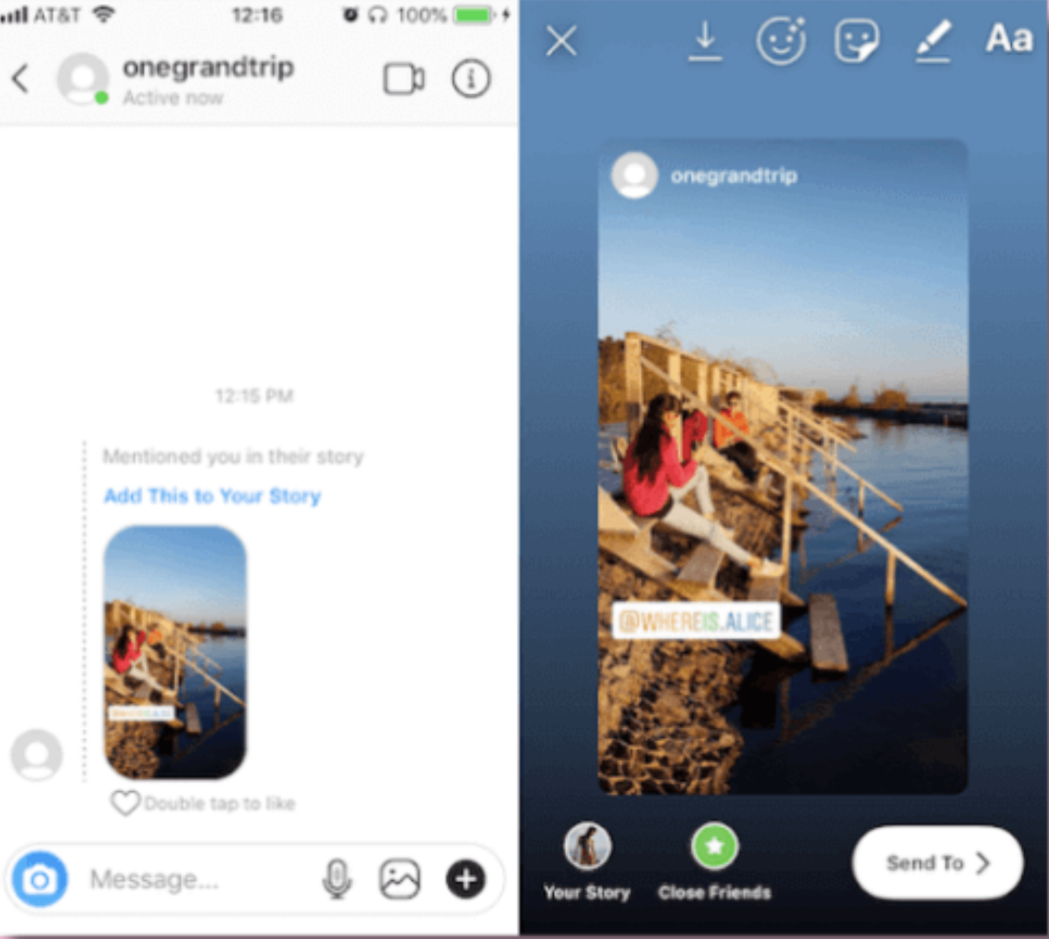
Reposting an Instagram Story is simple, but there are a few key steps to follow. If someone tags you in their Story, Instagram automatically sends you a direct message with the Story included. From there, you can easily share it with your own followers. Here’s how:
- Open the Instagram Story where you've been tagged.
- Tap the "Add to Story" button that appears.
- Customise the Story by adding text, GIFs, emojis, stickers, or other creative elements to make it your own.
- Share the updated Story to your Instagram Story for your followers to see.
This method works only for Stories where you've been mentioned. If you want to share a Story you weren’t tagged in, you’ll need to use alternative methods like taking a screenshot or using a third-party app. We cover all of those methods in this article.
Pro Tip: Before you publish the shared Story, tap it to enlarge it. This way, it will look much better, and the original author will still get credit.
How to repost a Story on Instagram without being tagged
Under Instagram’s rules, getting written or verbal permission to share the post first is important. Use the sample message above to ensure you get all the right information from users. Once you’ve got permission, there are two ways you can repost a story:
- Record the screen using your phone’s record screen feature and upload the recording to your story
- Record or screenshot the screen using your phone's record screen or screenshot feature and schedule it with a social media tool
- Use a third-party app like Repost It
How to repost an Instagram photo or video as a Story
When you’ve found a photo or Instagram video you think your audience would enjoy, take the following steps:
- Click the “Share” button (which looks like a little paper aeroplane) below the photo or video
- Edit your story to include any extra texts, GIFs, or emojis
- Click the “Add to Story” button

How to repost Reels on Instagram Stories
Instagram Reels are a powerful way to reach new audiences, especially through the Explore page. If you find a Reel that aligns with your brand or resonates with your audience, you can easily share it to your Instagram Story.
Here’s how:
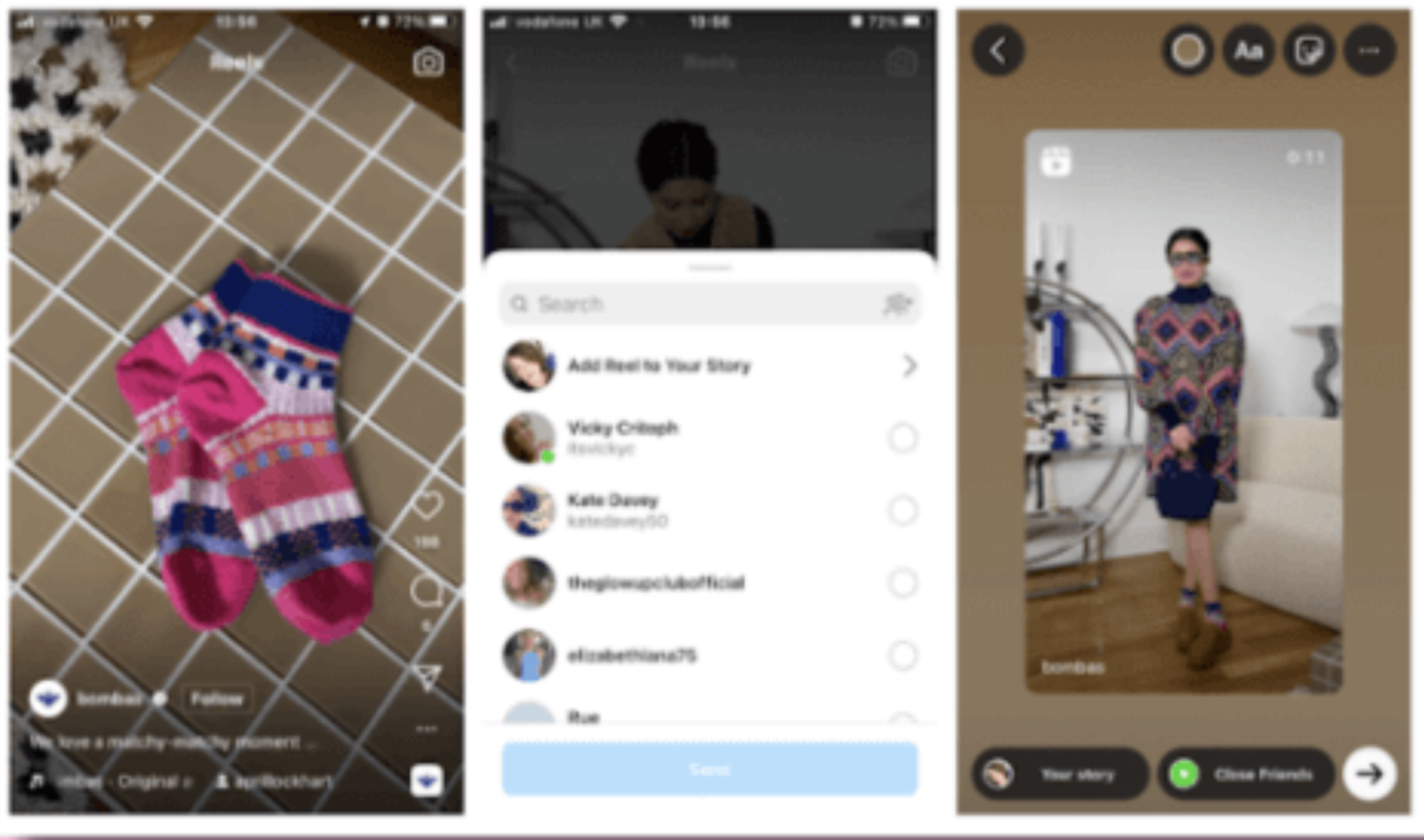
- Open the Reel you want to share.
- Tap the paper airplane (Share) icon below the Reel.
- Select "Add to Story."
- Customise your Story by adding text, stickers, GIFs, or interactive elements.
- Tap "Share" to post it to your Story.
How to generate engagement with Instagram Story reposts
Ready to include Instagram Story reposts in your social media strategy? Here are some top tips to remember to ensure you’re getting the most out of resharing content.
- Get the best image quality
- Curate user-generated content
- Acknowledge accounts that have mentioned you
- Add your stamp to reshared stories
- Create Highlights of your reposts
#1 Get the best image quality
Reposting content can often result in less-than-stellar image quality-especially if you’re screenshotting or screen recording the posts you want to reshare. If you find that the quality is suffering, try requesting the original files from the creator.
This works particularly well if it’s someone you’ve worked with or collaborated with in the past.
#2 Curate user-generated content
There are so many masterful content creators out there that are probably posting about your brand.
Most of the time their photos look professional, as they take them from incredible angles and retouch them with filters like Instagram Photoshop actions. This is why having a wealth of user-generated content to tap can help plug the gaps when your own production levels are low. Curate customer-created posts by:
- Using a hashtag
- Creating a category in Saved posts to build out your own library of UGC content
- Sprinkling UGC posts in between brand-created content
#3 Acknowledge accounts that have mentioned you
Instagram is built on people supporting one another.
Hence why hashtags like #FollowForFollow and others are so popular. You could say the same is even more true of Threads. So, when it comes to reposting, make sure to either get permission or tag the original creator (and if they’re a professional, pay them, if that’s possible; or say thank you in some other way, like sending a gift voucher or free product).
Ensure your followers and customers feel valued by acknowledging profiles that have mentioned you in their stories and sending a quick thank you message or commenting as your brand under the original post.
#4 Add your stamp to reshared stories
Instagram Stories has a bottomless library of fun GIFs, emojis, music, and additional features like polls, check-ins, and tags that can level up your reshares.
Try adding your own stamp to posts, videos, and Instagram stories you repost with text and visuals in your brand colours and voice
Here’s a tutorial for inspo:
#5 Create Highlights of your reposts
The Instagram Highlights feature groups your stories and keeps them on your profile longer than the standard 24 hours.
If the stories, photos, and videos you’re reposting to your Instagram Story are particularly useful or follow a similar theme, why not group them into topics under their own Highlight?
This makes it easy for your followers to find relevant content and browse through curated content for a more engaging experience.
Bonus: Can I repost a comment on Instagram?
Why just share a Reel or Feed Post to your Story when you can spice it up with a relatable comment written by you or another follower?
Instagram's new feature lets you share any comment from a public account's Reel or Post directly to your Story. This can help boost engagement by encouraging more comments, sharing social proof more interactively, or re-promoting a post.
Follow these steps to share a comment and personalise your story:
- Find the comment: Scroll through your feed (or published post) and locate the comment you want to share.
- Select the comment: Swipe left (iPhone) or tap and hold (Android) on the comment and tap “Add to Story +”.
- Sticker placement: The comment will appear as a sticker over the post or Reel. You can resize and move it anywhere within your story frame.
- Customise your story: Use Instagram's tools to add filters, text, music, interactive features, or other stickers to make your story even more engaging.
- Post your story: When you're satisfied with the look, tap "Your Story" to share it with your followers.
This feature is similar to how TikTok and YouTube Shorts allow users to respond to comments with videos, encouraging more interaction and increasing reach.
Now, when you find a comment you love, you can easily share it and add a personal touch to prolong the life of your Instagram content.
Key takeaways: Make Instagram Story reposts a part of your social media strategy
Reposting to Instagram Story is a great way to increase your following, share customer-created content, and boost your Instagram engagement.
But it’s important to get it right. Give credit where it’s due and make sure you ask for permission if you need it before you share to your Instagram Story.
Otherwise, get creative!
Curate user-generated content, add your own stamp to your reposts with a sticker, text, and GIF, and create Story Highlights to immortalise shared content on your profile.
Use our Instagram Audit Checklist to uncover optimisation opportunities on your profile and find the best ways to incorporate reposts in your social media strategy.
You can then use Sendible's analytics feature to see which posts are generating the most engagement, allowing you to put more effort into the strategies that are working best.
Want to repost and boost your Instagram strategy?
Benefit from Sendible’s Instagram features: Schedule and share a range of Instagram content formats at optimal times, utilise the right hashtags and manage your community.
